


Remember the last time you were at a sprawling convention center, staring blankly at a map that might as well have been written in hieroglyphics? Or perhaps you’ve experienced the joy of circling the same exhibit hall three times, convinced that your destination is playing an elaborate game of hide-and-seek? Well, folks, the future is here, and it’s here to save us from our directionally challenged selves. Enter Augmented Reality (AR) Wayfinding: the superhero we didn’t know we needed in the labyrinth of large venues. Below, we look at how augmented reality wayfinding works, and venue teams can compare notes on guest technology through trade groups such as the International Association of Venue Managers.
As we march steadily towards 2025, venue managers are buzzing about this tech like it’s the second coming of sliced bread. And honestly? They might be onto something. AR Wayfinding is set to revolutionize how we navigate complex spaces, from fairgrounds that seem to stretch into another dimension to multi-level concert halls that make M.C. Escher drawings look straightforward. It’s like someone finally heard our collective cry of “I just wanted to find the bathroom, not embark on an epic quest.”
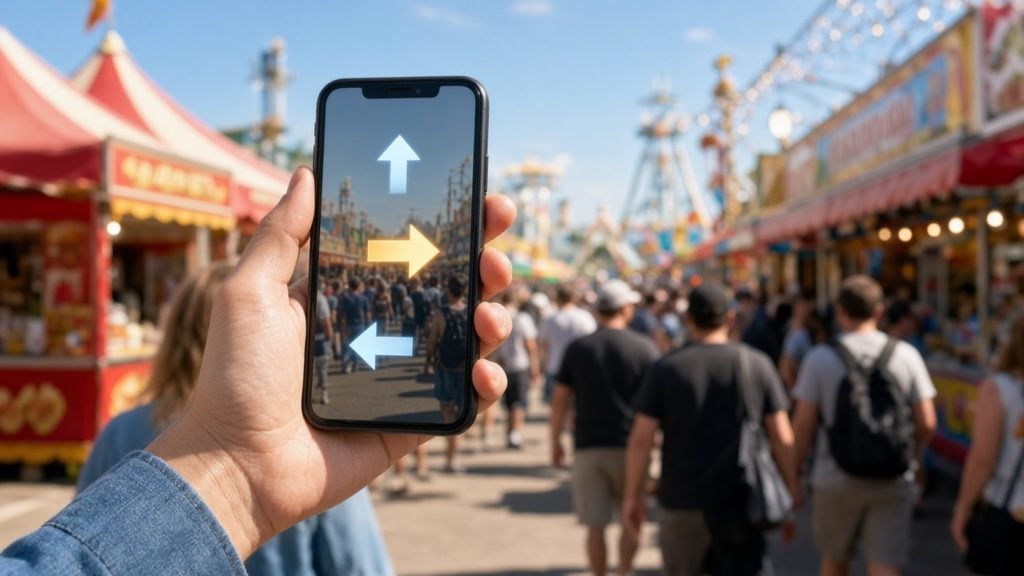
So, what’s this wizardry all about? Imagine your smartphone’s camera is suddenly blessed with the power to see the invisible. Point it around, and voila! Digital breadcrumbs appear, guiding you to your destination. It’s like having a GPS for indoor spaces, minus the robotic voice telling you to make a U-turn in the middle of a crowded hallway. And let’s be honest, we’ve all wanted to throw our phones across the room when that happens.
Here’s how augmented reality wayfinding works:
- You whip out your trusty smartphone and fire up the venue’s app. (Yes, another app. I know, I know, but bear with me. Your phone’s storage can handle it, even if your patience is wearing thin.)
- The app hijacks your camera – with your permission, of course. We’re not savages. Though it might feel like your phone is possessed by a very helpful ghost.
- Through a cocktail of GPS, Wi-Fi signals, and possibly some dark sorcery, it figures out where on earth you are. It’s like a high-tech version of “Marco Polo,” minus the wet hair and chlorine smell.
- Then, like a digital graffiti artist, it starts plastering your screen with arrows, info bubbles, and possibly the occasional snarky comment about your choice of destination. “The gift shop again? Really?”
- As a bonus, it updates in real-time. So if the crowd suddenly decides to form a human barricade, it’ll find you a new route faster than you can say “panic attack.” It’s like having a tiny, all-knowing navigator in your pocket, minus the backseat driving.
But wait, there’s more! (As if finding your way wasn’t exciting enough.) This tech isn’t just about preventing you from wandering aimlessly like a lost puppy. It’s got more tricks up its sleeve than a magician at a kids’ party.
For instance, imagine pointing your phone at a nearby statue and getting its entire history, complete with fun facts and maybe a dad joke or two. Or how about real-time updates on queue lengths? “The line for the rollercoaster is currently longer than the queue for the latest iPhone. Maybe try the merry-go-round?”
And for those of us who can never remember where we parked, AR Wayfinding is here to save the day. No more wandering the parking lot, pressing your key fob repeatedly like you’re trying to summon your car through sheer force of will. The app remembers, so you don’t have to. It’s like having a responsible friend who actually pays attention when you park.
Now, for the venue managers out there (bless your souls), this isn’t just about preventing visitors from wandering aimlessly like lost puppies. Oh no, it’s a goldmine of benefits that’ll make you feel like you’ve struck oil in your backyard:
- Happy Visitors: People who aren’t lost tend to be happier. Revolutionary concept, I know. They might even smile at you instead of asking for directions for the 47th time.
- Efficiency: Less time spent giving directions means more time for… well, whatever it is venue managers do when they’re not giving directions. Streamlining operations? Planning world domination? The choice is yours.
- Data, Sweet Data: You’ll get more insights into crowd movement than a seasoned people-watcher at a busy mall. It’s like having x-ray vision for foot traffic patterns.
- Goodbye, Signage Overload: You can finally take down that forest of signs. Save a tree, use AR. Your venue will no longer look like a life-sized version of “Where’s Waldo?”
- Instant Updates: Event location changed? No problem. Update the AR, and watch as the crowd smoothly redirects like a well-orchestrated flash mob. It’s almost poetic.
- Cha-Ching: New ways to make money? You bet. “Turn left at the sponsor’s logo” could be the new “This event brought to you by…” It’s product placement for the 21st century.
- Crowd Control: Guide people away from congested areas smoother than a traffic cop with a Ph.D. in flow dynamics. No whistle required.
But let’s not forget about the real heroes here – the visitors. They get to:
- Navigate without breaking a sweat (or their dignity). No more pretending to text while actually trying to figure out where on earth they are.
- Save time for more important things, like debating the merits of overpriced venue snacks. Is that hot dog really worth the price of a small car?
- Customize their experience. Wheelchair route? Got it. Avoiding crowds? We hear you. Trying to dodge that ex you just spotted? We’ve got your back.
- Access info faster than you can say “Excuse me, where’s the…” It’s like having a know-it-all friend, minus the smug attitude.
- Understand signs in their language, because “Exit” in 17 languages is so last year. Now you can get lost in translation-free bliss.
- Find the nearest exit when that experimental interpretive dance performance becomes too much to bear. We won’t judge your artistic preferences (much).
- Discover hidden gems they might have missed otherwise. That obscure exhibit in the corner? It’s about to become the next big thing.
Now, it’s not all rainbows and perfectly navigated paths. Implementing this tech comes with its own set of headaches that might make you want to stick to paper maps and friendly staff with “Ask Me” buttons:
- Infrastructure Needs: Hope you like Wi-Fi, because you’ll need it. Everywhere. Even in places you didn’t know existed in your venue.
- App Development: Time to make friends with the techies who speak in code. Maybe learn a few words like “algorithm” and “user interface” to impress them.
- Getting People to Actually Use It: Because apparently, some people enjoy being lost. It’s a lifestyle choice, we suppose.
- Device Drama: Making it work on everything from the latest iPhone to that flip phone your uncle refuses to give up. Yes, some people still have those.
- Data Privacy: Proving you’re not secretly planning world domination with all that movement data. “No, we don’t want to know your life story, just where you’re going in our venue.”
- Playing Nice with Other Systems: Because if your systems don’t talk to each other, chaos ensues. It’s like a dysfunctional family reunion, but with computers.
- Keeping It Current: Venues change, events move, and your AR system needs to keep up faster than gossip spreads at a high school reunion.
For those brave souls ready to dive into the AR Wayfinding pool (don’t worry, it’s not as deep as it looks), here are some tips to keep you afloat:
- Start Small: Rome wasn’t built in a day, and neither will your AR empire be. Maybe start with guiding people to the restrooms. It’s a universal need.
- User-Friendly is Key: If a technophobe can’t use it, back to the drawing board you go. Think “my grandma could figure this out” level of simplicity.
- Keep the Old School: Some people still like maps. Weird, I know, but true. It’s like the vinyl records of navigation.
- Train Your Staff: They should know the system better than they know the back of their hand. Or at least as well as they know their favorite coffee order.
- Shout it from the Rooftops: Let people know about this cool new toy. Subtlety is overrated. Maybe skywrite it if you’re feeling fancy.
- Update, Update, Update: Keep it fresh, or watch it join the ranks of abandoned apps everywhere. Don’t let your AR system become the digital equivalent of a ghost town.
- Gather Feedback: Listen to your users. They might have ideas that are actually useful. Shocking, I know.
Looking ahead, the future of AR Wayfinding is brighter than a neon sign in Vegas. We’re talking glasses that guide you without you having to look like you’re constantly taking selfies, AI that knows you better than you know yourself (slightly creepy, but convenient), and seamless navigation from your car to your seat without a single “Um, I think it’s this way.”
Imagine a world where you never have to awkwardly interrupt a stranger’s conversation to ask for directions. A utopia where “I’m sure it was around here somewhere” becomes a phrase of the past. A future where your biggest venue-related stress is choosing between the overpriced popcorn or the overpriced nachos.
AR Wayfinding is here to rescue us from the clutches of confusion and the embarrassment of asking for directions for the umpteenth time. It’s turning complex venues from navigational nightmares into walks in the park. Well, very large, indoor parks with lots of events and people, but you get the idea.
So, venue managers, it’s time to embrace the future. Your visitors will thank you, your staff will thank you, and most importantly, those poor, overworked “You Are Here” dots can finally retire. They’ve served us well, but it’s time to put them out to pasture.
The era of wandering aimlessly is over. No more will we roam halls like lost souls, no more will we squint at tiny maps, trying to decipher if that squiggle means “restaurant” or “restroom.” We’re entering a brave new world of effortless navigation, where the phrase “I think it’s this way” becomes as obsolete as a floppy disk.
Long live AR Wayfinding! May our paths be everclear, our destinations always in sight, and our days of feeling like a rat in a maze be nothing but a distant, slightly embarrassing memory. Now, if you’ll excuse me, I need to find the exit. Where did I put my phone again?
Augmented Reality Wayfinding at Fairs: A Practical Plan for Fair Boards
The fun part of augmented reality wayfinding is the arrows on the screen. The hard part is everything that has to be true for those arrows to point the right way. For fairs, where the layout changes every season and much of the grounds is outdoors, a careful plan matters more than the app itself. Here is how a fair board or operator can approach it without overspending.
Start With the Trips Guests Make Most
Guests rarely need directions to everything. They need the restrooms, food, first aid, the exits, the shuttle stop, and their car. Start your wayfinding plan with those trips. Map them on paper first, walk them at different times of day, and note where guests actually get stuck. Our guide to fair concession queue planning shows how food lines can block the paths guests use most.
Keep Signs and Staff as the Backbone
Not every guest will download an app, and phones run out of battery on long, hot days. Physical signs, printed maps, and friendly staff remain the backbone of wayfinding, with AR as an extra layer. The original article’s advice to “keep the old school” is sound. Make sure the information on signs, maps, and the app all match.
Build Accessibility In From the Start
Wayfinding that ignores guests with disabilities is not finished. The Department of Justice’s guidance on effective communication explains obligations to communicate effectively with people who have vision, hearing, or speech disabilities, and the U.S. Access Board’s guide to accessible routes explains what makes a route usable. If your app offers a wheelchair route, walk it yourself with someone who uses a wheelchair, and check slopes, surfaces, and temporary cables. Our article on accessible fair concessions covers the booth-level details.
Protect Guest Data
Location data is personal data. Collect only what you need, explain it plainly, and decide in advance how long you keep it. The Federal Trade Commission’s guide to protecting personal information is a practical starting point for any vendor contract or privacy notice. Ask any technology vendor where the data is stored and who can see it.
Use Wayfinding for Safety, Not Just Convenience
Real-time updates are most valuable when something goes wrong: a closed gate, a lost child, heat, or a storm. Tie the wayfinding plan to your emergency plan so guests can be pointed to shade, shelter, and exits quickly. OSHA’s crowd management safety guidelines stress planning and trained staff, and the National Weather Service’s Event Ready resources help event teams prepare for severe weather. Our article on fair guest shade and heat planning shows how to put cooling spots on the map.

Pilot, Measure, Then Expand
Run a small pilot in one area, such as the food court or the main exhibit hall. Measure whether guests use it, how often staff are still asked for directions, and whether lines and crowding improve. Gather feedback from guests and staff, fix what does not work, and only then expand. Venue peers in the International Association of Venue Managers and the Western Fairs Association can share what has and has not worked at other venues.
Good wayfinding helps guests find food faster, spend more time enjoying the fair, and leave happier. If your fair board wants help planning food court layout, guest flow, and signage that works with or without augmented reality wayfinding, schedule a consultation with FairFirst.


